Search
Cart
Sign in
  • offerCustomer zone
  • offerYour orders
  • offerEdit account

  • offerAdd project
  • offerLiked projects
  • offerView your artist profile

  • Dark mode

We care about your privacy

We use cookies to provide you with the best possible experience. They also allow us to analyze user behavior in order to constantly improve the website for you. The consent is voluntary. You can withdraw it at any time or renew it in Cookie settings on the home page. Withdrawal of your consent does not affect the lawfulness of processing performed before the withdrawal. Privacy Protection Policy
Accept all
Accept selection
Reject all

Spline Refiner Plugin for 3ds Max

Press release 2018-12-07 09:16 article  > Software

Fine tune your splines in a fast and efficient way without losing details.

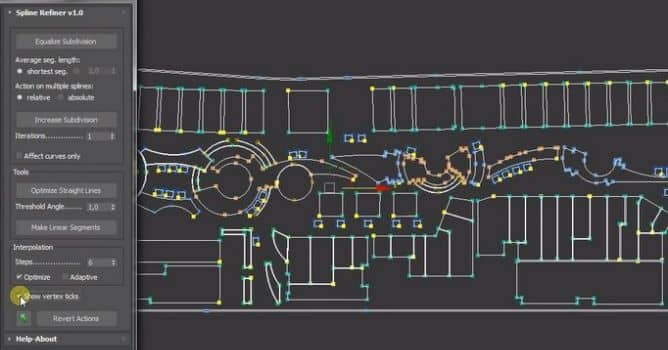
Spline Refiner is a 3dsMax productivity tool to fine-tune your spline shapes. With this plugin, you can subdivide the splines uniformly, in a human-like manner, adding detail only where it needs to. So, you get a balanced segments distribution without altering the shape of your curves or touching the existing vertices.


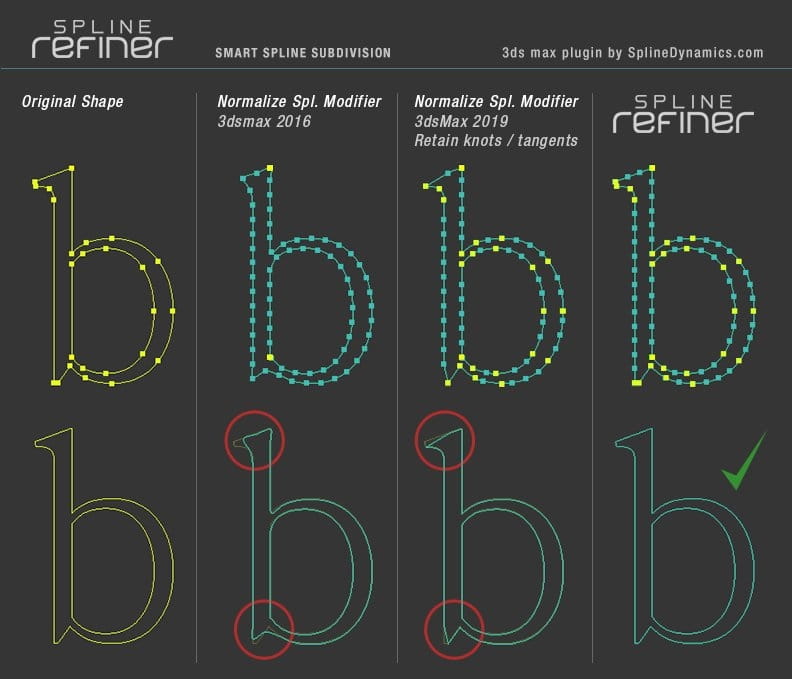
Unlike 3dsMax’s Normalize Spline modifier, this tool analyzes the current vertex distribution and smartly determines the best way to get an even segmentation, preserving the integrity of the shape. It does not work with a fix segmentation value. It calculates an average value for every segment to get a general uniform subdivision. The result is always consistent and pleasant to human eye.

The folowing is a comparison between 3dsMax’s Normalize Spl. modifier and Spline Refiner action over fine details.
 

nr_00901_Untitled_9


Spline Refiner can process hundreds of splines in seconds, with just a few clicks. This is ideal for CG artists and professionals who usually work with vector curves in 3dsMax, e.g. for Architectural Visualization (Arch-Viz), Engineering, Industrial Design, 3D logo design and spline modeling in general.

Spline Refiner is a commercial script for 3dsMax 2012 and higher.

Features

  • Simple, user-friendly UI, thought for fast workflow.
  • Supports actions on multiple shapes simultaneously.
  • Supports shapes with modifiers applied. (Acts on base object level)
  • Equalize Subdivision: generates a uniform spline segmentation, preserving the existing vertices.
    – Segment length:  automatic calculation or based on a user input.
    – Action on multiple splines: selectively per each spline or general for all shapes.
    – Operates either on the whole spline or only on curved parts (excluding straight lines).
  • Increase Subdivision: divide every segment in spline in 2 halves.
    – Apply the action recursively n number of times.
    – Affect the whole spline or just curved parts.
  • Optimize straight lines: delete unnecessary vertices from straight lines.
  • Convert all segments to linear.
  • Change basic curve interpolation parameters for all selected shapes.
  • Show vertex ticks’ switch to better display changes on segmentation.
  • Custom ‘Undo last action’ command.
  • Revert Actions: undo all the changes made on selected shapes.
  • No plugin-dependency. Simple drag & drop installation.

More info on Spline Dynamics site.

Author: Press release Editor: Michał Franczak
Tags: spline 3dsmax vector
You may also like...
Making of wooden interior - Tip of The Week

Making of wooden interior - Tip of The Week

Scene 4 from Archinteriors vol. 28.
×

LEAVE A COMMENT

You need to be logged in to leave a comment. Don't have account? Register now.