This scene was made by Piotr Mróz from Evermotion and it is a part of Archinteriors vol. 37 collection - Swedish style home interiors. Swedish style bases on high-key lighting, bright surfaces, clean post-production and quasi-vintage props. You can buy this scene separately for €50 in Evermotion Shop or purchase entire Archinteriors vol. 37 collection (10 scenes) for €120.
Click on image to enlarge 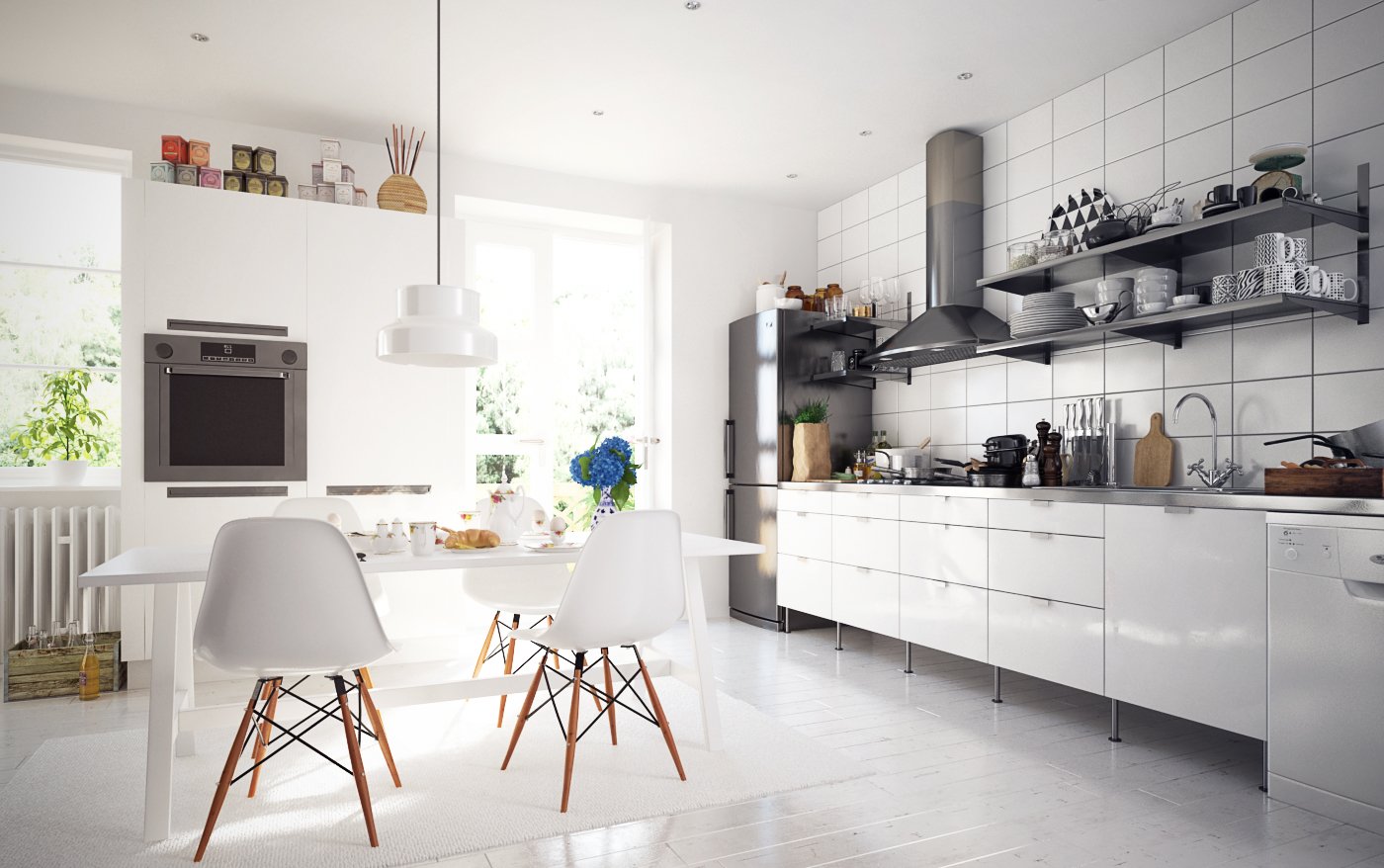
Final image after post production
Click on image to enlarge 
Click on image to enlarge 
Overview of the scene in 3ds Max viewport.
Click on image to enlarge 
External view - simple techniques - cylindrical background map, grass plane and V-ray Sun
Click on image to enlarge 
Grass material - simple V-ray material with single diffuse map
Click on image to enlarge 
The only correction was a bit of desaturation and slight hue shift.
Click on image to enlarge 
Click on image to enlarge 
Environment - a cylinder with V-ray light material
Click on image to enlarge 
Click on image to enlarge 
We put background map in V-Ray light material
Click on image to enlarge 
There are two types of floor in this scene. Interior floor (grey in viewport) and terrace floor (light wood in viewport)
Click on image to enlarge 
Interior floor material is quite sophisticated - it is a blend of 3 V-Ray materials
Click on image to enlarge 
Interior / floor - base material
Click on image to enlarge 
Interior / floor - coat material
Click on image to enlarge 
Interior / floor - 2nd coat material
Click on image to enlarge 
Interior / floor - blend maps
Click on image to enlarge 
Terrace floor material is much simplier
Click on image to enlarge 
Interior is made of very simple mesh
Click on image to enlarge 
Wall material - just plain, white material.
Click on image to enlarge 
We put a lot of props in this scene. They are making it full of life and realistic.
Click on image to enlarge 
Click on image to enlarge 
Table is set for breakfast
Click on image to enlarge 
There are four light sources in the scene. v-ray light lister shows three lights, because one of sources is instanced.
Click on image to enlarge 
First light (door behind camera)
Click on image to enlarge 
Second and third light settings
Click on image to enlarge 
Click on image to enlarge 
Click on image to enlarge 
Click on image to enlarge 
Click on image to enlarge
Again - final image after post production
Hope you find this tutorial useful! You can find entire collection in Evermotion Shop: Archinteriors vol. 37.


 Customer zone
 Your orders
 Edit account
 Add project
 Liked projects
 View your artist profile













COMMENTS