Optimize your Unreal Engine scenes and use powerful layered materials.
Using material layers in Unreal Engine 5 brings a myriad of benefits. Firstly, it allows for efficient organization and management of complex materials, enabling creators to maintain a structured workflow. By breaking down materials into layers, such as base, detail, and effects, developers can easily iterate on different aspects without affecting the entire material. It also helps in optimization - you can mix a bunch of base materials and you do not have to create dozens of unique materials for your meshes.
This modularity enhances collaboration among team members and facilitates the reuse of material elements across different assets, saving valuable time and resources. Additionally, material layers offer greater flexibility in creating intricate textures and effects. Learn about layers in UE5 materials:
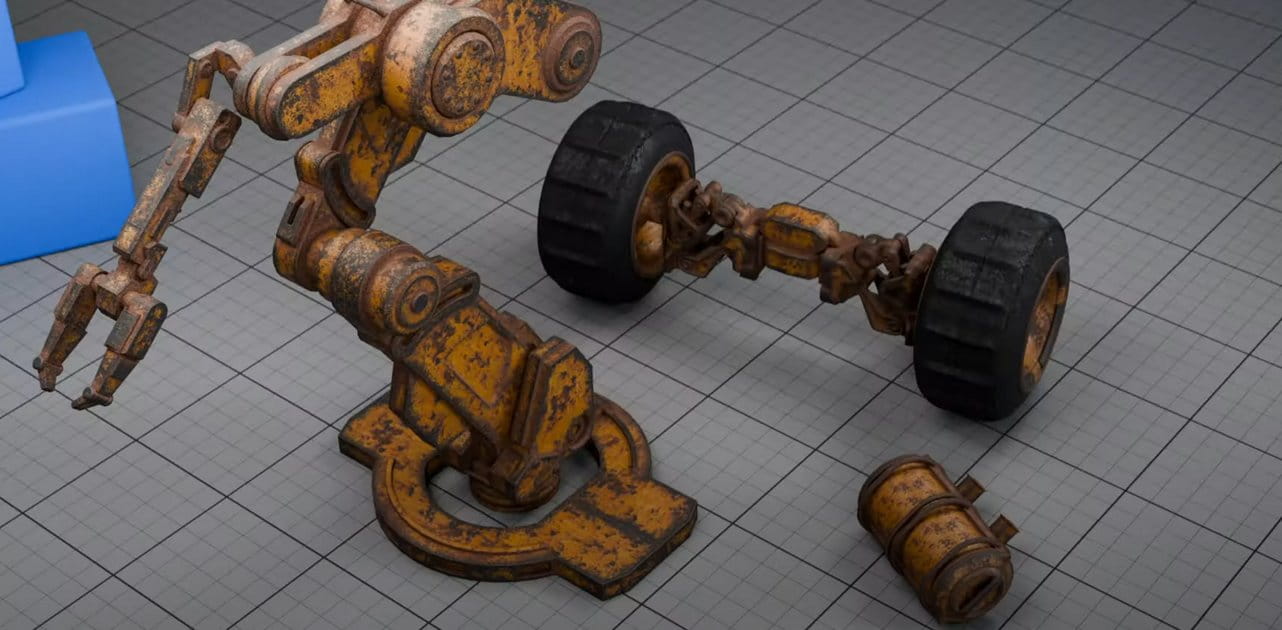
Material layering in Unreal Engine is a powerful feature that allows for the creation of complex, realistic materials by combining multiple layers of textures and material properties. This technique mimics the way real-world surfaces are built up from different layers, such as paint over primer, dirt over metal, or moss over stone. Here’s a technical overview of how material layering works in Unreal Engine:
Material Layering System: Unreal Engine uses a Material Layering system that lets developers stack different material layers on top of each other. Each layer can have its own set of properties, such as base color, roughness, normal maps, and other attributes. This system is highly flexible and allows for procedural control over how layers interact.
Material Layer Blend Node: At the core of the layering system is the Material Layer Blend node, which allows the blending of multiple material layers. This node supports various blend modes, such as additive, subtractive, and overlay, enabling precise control over how each layer influences the final material appearance.
Layer Masks: To control where each layer appears on the surface, developers use layer masks. These are typically grayscale textures that define the opacity of each layer at every point on the surface. For instance, a dirt layer mask might use a noise texture to simulate dirt accumulating in crevices.
Material Functions: Unreal Engine uses Material Functions to encapsulate the logic for each layer. Material Functions are reusable and can be combined in various ways to create complex materials. This modular approach promotes efficiency and consistency across different materials.
Vertex Painting and Procedural Techniques: Developers can use vertex painting to manually control layer distribution on a surface. This is particularly useful for adding details like wear and tear or blending materials seamlessly in an environment. Additionally, procedural techniques, such as using world-space coordinates or noise functions, can dynamically control layer distribution based on environmental factors.
Performance Considerations: While material layering allows for highly detailed surfaces, it can impact performance due to increased complexity in shader calculations. To mitigate this, Unreal Engine provides optimization tools such as shader complexity view modes and profiling tools to help developers balance visual fidelity with performance.
Real-World Applications: Material layering is extensively used in creating realistic environments in games and simulations. For example, a terrain material might combine layers for grass, dirt, rocks, and snow, with each layer blending based on factors like slope angle, altitude, and weather conditions.
Customization and Flexibility: The Material Layering system in Unreal Engine is highly customizable. Developers can create custom blend modes, define unique layer interactions, and use blueprint scripts or material parameter collections to dynamically change material properties at runtime, adding a level of interactivity and realism.
By leveraging the Material Layering system, Unreal Engine enables the creation of rich, detailed surfaces that can react and change based on gameplay events or environmental conditions, significantly enhancing the visual realism and immersion of 3D scenes.
Working in CG and archviz often means balancing creative intent with production realities. Human presence can support scale, context, and clarity, but it also adds another layer of decisions. Ready-made 3D character assets help keep visual focus where it belongs without expanding the project scope beyond its real needs
In professional visualization, buildings are more than background elements. They define context, scale, and clarity for industrial and commercial projects. Well-prepared 3D building models help viewers read a scene instantly and understand its purpose without relying on technical descriptions or supporting text
The production pipeline in CG and visualization is built on a sequence of clear decisions. Each stage depends on how information is defined, shared, and preserved. 3D models serve as digital assets that translate abstract ideas into structured visual data and consistently carry them through to the final render
In professional CG and architectural visualization, efficiency depends on structured decision-making and reliable resources. Using grouped 3D assets allows us to focus on scene logic, composition, and project consistency instead of repetitive asset preparation and library management.
3D furniture models support structured, predictable interior design workflows in professional archviz. In projects where deadlines, coordination, and visual consistency matter, ready-to-use assets reduce friction and enable teams to focus on spatial decisions rather than repetitive preparation.
In this walkthrough, we guide you through the process of building a polished 3D interior scene inspired by the cover of Archmodels vol. 306 – Table Sets.
















 Customer zone
 Your orders
 Edit account
 Add project
 Liked projects
 View your artist profile
COMMENTS