Material Texture Loader for 3ds Max
Managing textures in large scenes can be challenging, especially when projects involve multiple assets. Our Material Texture Loader for 3ds Max simplifies this process by allowing you to quickly load and organize materials without interrupting your workflow. Designed for professionals who work with complex visualizations, this tool ensures you spend less time on technical steps and more time on creative work. Using it effectively can significantly reduce file preparation time, helping you maintain consistency across every material in your project.
The Material Texture Loader supports a wide range of formats, making it easy to integrate into existing pipelines. By streamlining the process of assigning and modifying textures, you can avoid issues related to missing paths or inconsistent materials. This translates to faster scene setup, resulting in improved project delivery times. Our users appreciate the reliability and simplicity of the tool, as it is fully optimized for 3ds Max and compatible with professional workflows used in architectural visualization and product rendering.
Speed and Organization in One Solution
The Material Texture Loader is built with speed and clarity in mind. Large projects often require hundreds of textures, and manually linking them can lead to errors. This solution automates the linking process, ensuring that your materials are correctly applied without constant manual checks. With fewer interruptions, you can focus on achieving the highest level of visual quality possible.
The tool’s intuitive interface allows you to preview, manage, and edit textures quickly. Clean asset management = fewer delays and smoother revisions. This is particularly valuable for teams that handle demanding deadlines and require reliable tools to support them. Combined with the quality of our 3D models, the Material Texture Loader enhances productivity and gives you the confidence that your materials are always correctly set up. By incorporating it into your workflow, you gain a dependable solution that improves both speed and organization, making it an essential resource for professionals working in 3ds Max.
The Material Texture Loader is a 3ds Max script, designed to quickly load in textures, create a material and apply that to your scene. It works both with PBR, Specular and Metalic workflows, but it can be used for any type of texture that needs to be loaded as part of a material.
Supports Vray, Corona, Redhift, Arnold, FStorm, Physical and Standard materials. Compatible with 3ds max 2016 to 2020.
Download: https://gumroad.com/l/XOPH






 Customer zone
 Your orders
 Edit account
 Add project
 Liked projects
 View your artist profile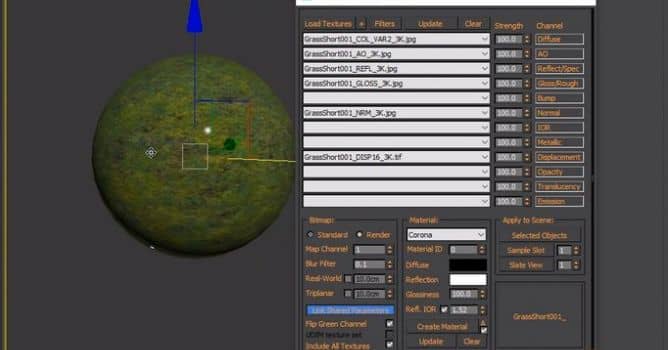















COMMENTS