We use cookies to provide you with the best possible experience. They also allow us to analyze user behavior in order to constantly improve the website for you.
The consent is voluntary. You can withdraw it at any time or renew it in Cookie settings on the home page. Withdrawal of your consent does not affect the lawfulness of processing performed before the withdrawal.
Privacy Protection Policy
Expresii currently focuses on mimicking Eastern ink painting/calligraphy only. Eastern ink is similar to but not exactly like Western watercolor. e.g. a drop of watery paint on most Eastern painting paper s would absorbed and spread out immediately; on Western watercolor paper the drop would just sit there without spreading.
For long-time digital painters, picking up Expresii requires some mind-shifting or getting used to:
Paint with a Gradient - In contrast to traditional paint apps, picking up of colors in Expresii is pressure-sensitive. The harder you press, the color goes more into the tuft. This way, you can get a multi-color loading similar to how you do it in real-life Eastern ink painting. Expand your skill set by learning to use the side of the brush to paint with a gradient instead of one color at a time.
Economy of Strokes - Try to reduce the number of strokes you make. More for less. In Expresii, we make it possible to appreciate even one individual stroke.
Rhythm is Everything - in some paint apps, you may be stamping scanned bitmaps of real strokes. At an extreme, this is close to how a designer works where you position design elements to form a composition . In Expresii, we want to promote another way of painting - one that is almost like a record of the movement of the brush driven by your hand. It's gestural. It's more like a serendipity where you can't create the exact same thing twice.
Choice and Chance - You make some strokes and let the wet ink do its thing. It's not just simple put-that-color-there thing. The ink reacts to your action and could inspire your next stroke.
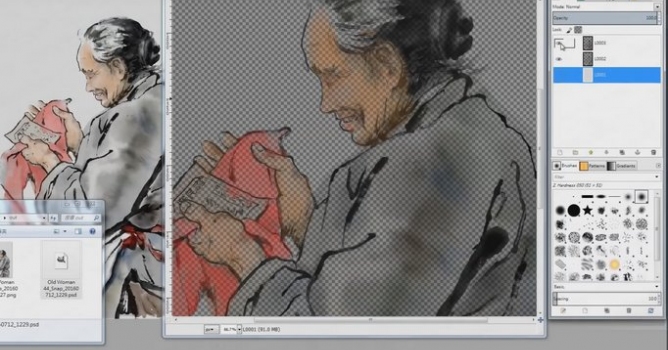
Limited layers - Currently Expresii only supports two layers. We'll add support for more layers in the future. In the meantime, the Snap-Down (rasterizing) to Underlay acts as a temporary solution when you run out of layers.
Introductory price is $59. You can download Expresii and try it for free - without license key the software is fully functional, you only cannot save your work. You can also submit Free Trial License Key.
If you have trouble with launching Expresii on Windows 10 machine, try launching it as Administrator. some dialog boxes can be confirmed only by hitting Enter, not by mouse.

Working in CG and archviz often means balancing creative intent with production realities. Human presence can support scale, context, and clarity, but it also adds another layer of decisions. Ready-made 3D character assets help keep visual focus where it belongs without expanding the project scope beyond its real needs
In professional visualization, buildings are more than background elements. They define context, scale, and clarity for industrial and commercial projects. Well-prepared 3D building models help viewers read a scene instantly and understand its purpose without relying on technical descriptions or supporting text
The production pipeline in CG and visualization is built on a sequence of clear decisions. Each stage depends on how information is defined, shared, and preserved. 3D models serve as digital assets that translate abstract ideas into structured visual data and consistently carry them through to the final render
In professional CG and architectural visualization, efficiency depends on structured decision-making and reliable resources. Using grouped 3D assets allows us to focus on scene logic, composition, and project consistency instead of repetitive asset preparation and library management.
3D furniture models support structured, predictable interior design workflows in professional archviz. In projects where deadlines, coordination, and visual consistency matter, ready-to-use assets reduce friction and enable teams to focus on spatial decisions rather than repetitive preparation.
In this walkthrough, we guide you through the process of building a polished 3D interior scene inspired by the cover of Archmodels vol. 306 – Table Sets.
COMMENTS