Search
Cart
Your cart - 0 items
Total: € 0
Total: € 0
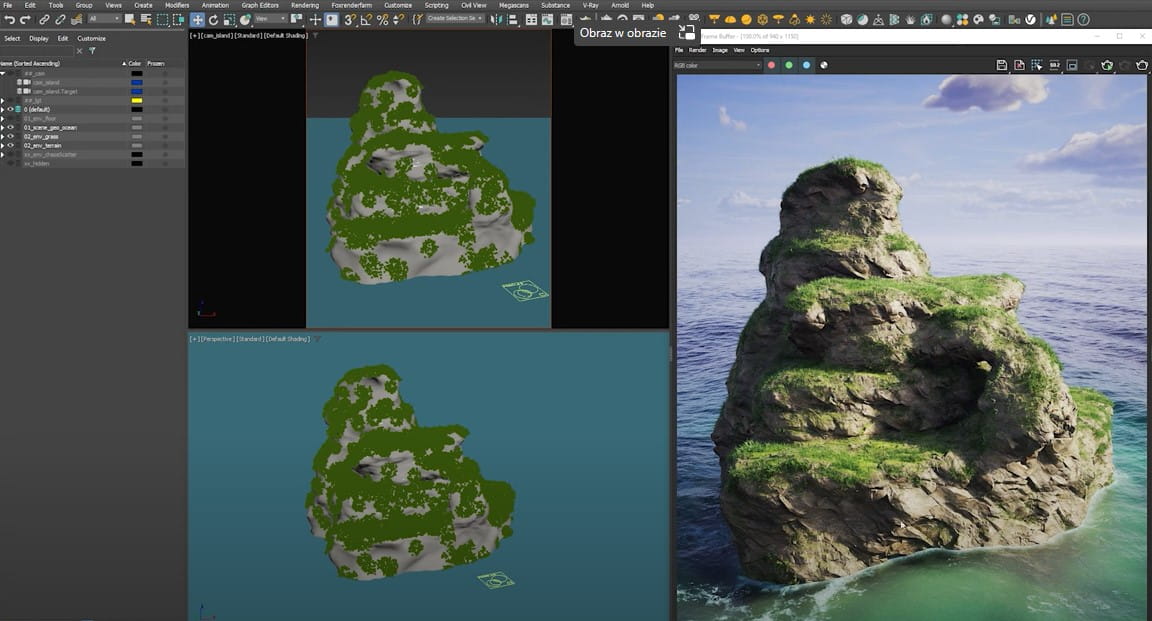

This tutorial Jonas Noell will teach you how to use a procedural workflow to automatically create interesting-looking rock or terrain surfaces. We'll start by creating a simple base geometry, then add details using modifiers. Then, utilizing Quixel MegaScans textures, we will create a number of base shaders, including various rock and grass surfaces. These textures will be automatically placed using UVW randomizations and triplanar projections on any type of surface. Finally, we will combine each separate shader using straightforward procedural techniques to get the finished product.
In this demonstration, Jonas Noell is using 3ds Max and V-Ray 6, however you can use similar methods with earlier versions like V-Ray 5, V-Ray NEXT, and V-Ray 3 by making modest adjustments.


LEAVE A COMMENT








|

|

|

|

|
 Customer zone
 Your orders
 Edit account
 Add project
 Liked projects
 View your artist profile

COMMENTS