Search
Cart
Sign in
  • offerCustomer zone
  • offerYour orders
  • offerEdit account

  • offerAdd project
  • offerLiked projects
  • offerView your artist profile

  • Dark mode
    ✔
Using Smart Extrude in 3ds Max to speed up modeling

Using Smart Extrude in 3ds Max to speed up modeling

YT 2021-04-07 11:27 tutorial  > 3ds MAX  > modeling

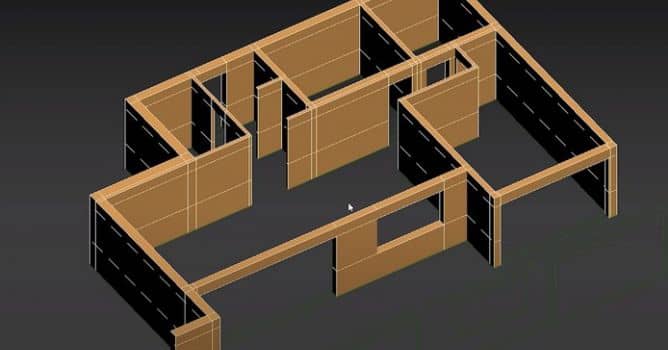
Extruding interior walls with the Smart Extrude in 3ds Max 2022.

In this video, you will see how to model the interior in the new 3ds max 2022, using smart extrude feature. You can use Smart Extrude to interactively extrude faces on an Editable Poly. Adjacent faces will be rebuilt and stitched together, matching the final visual output that the artists sees with no need to manually repair hidden faces or geometric data. Note: All selected and adjacent faces must be co-planar in order for Smart Extrude to correctly operate.


Author: YT Editor: Michał Franczak
Tags:
You may also like...
How to Speed Up Archviz Rendering Without Upgrading Your Hardware

How to Speed Up Archviz Rendering Without Upgrading Your Hardware

Save time, reduce stress, and focus more on the creative side of your projects.
×

LEAVE A COMMENT

You need to be logged in to leave a comment. Don't have account? Register now.