Evermotion: More Than an Asset Library
How Evermotion became a full-scale production partner for archviz, automotive and synthetic data.


Total: € 0


Hard surface modeling often involves many repetitive tasks that can be cumbersome after a longer while. You create new mesh, assign correct smoothing, mark edges as sharp, bevel them, use booleans, assign materials, clean mesh, etc… In Blender we have all the tools that are needed to create great hard surface models, but often these tools are scattered all over the interface (auto smooth in data panel, bevel and booleans as modifiers, materials in material panel, etc.).
The truth is - the more keystrokes are required for these operations, the faster you abandon detailing your models. In the effect you will not have very nice, detailed hard surface objects, you will give up half way there. And if you won't, you will spend countless hours on making great model. Can we make this process faster? This was the question that was asked by Hard Ops addon developers. they wanted to streamline the process of hard surface modeling and in our opinion, they succeded.
“It is my hope to make a tool that reduces keystrokes and turns processes into steps.” - masterXeon1001, Hard Ops main developer.
Hard Ops is currently in version 9.3 (called Neptunium). It’s a set of handy tools that make modeling easier and faster. And not only modeling. The idea behind this plugin is to gather common operations in handy menu and under shortcuts so it is no longer necessary to go to Properties or Tools panel.
Smoothing objects
If you create polygonal model in Blender, at the beginning it has no smoothing information and it appears as flat shaded during rendering. You can open Tolls menu and choose “smooth” option, but it will also smooth all edges, which will destroy your model shading.
Many users use “Edge Split” modifier for smoothing – after applying it your model will look smooth, but, unfortunately, edge split does exactly what it says – it splits edges, it produces tons of unwanted geometry and your model is literally cut into pieces – you will not be able to animate it, it will be more intensive to render due to double edges, you will not be able to add bevels, so it is a huge drawback for many scenarios.
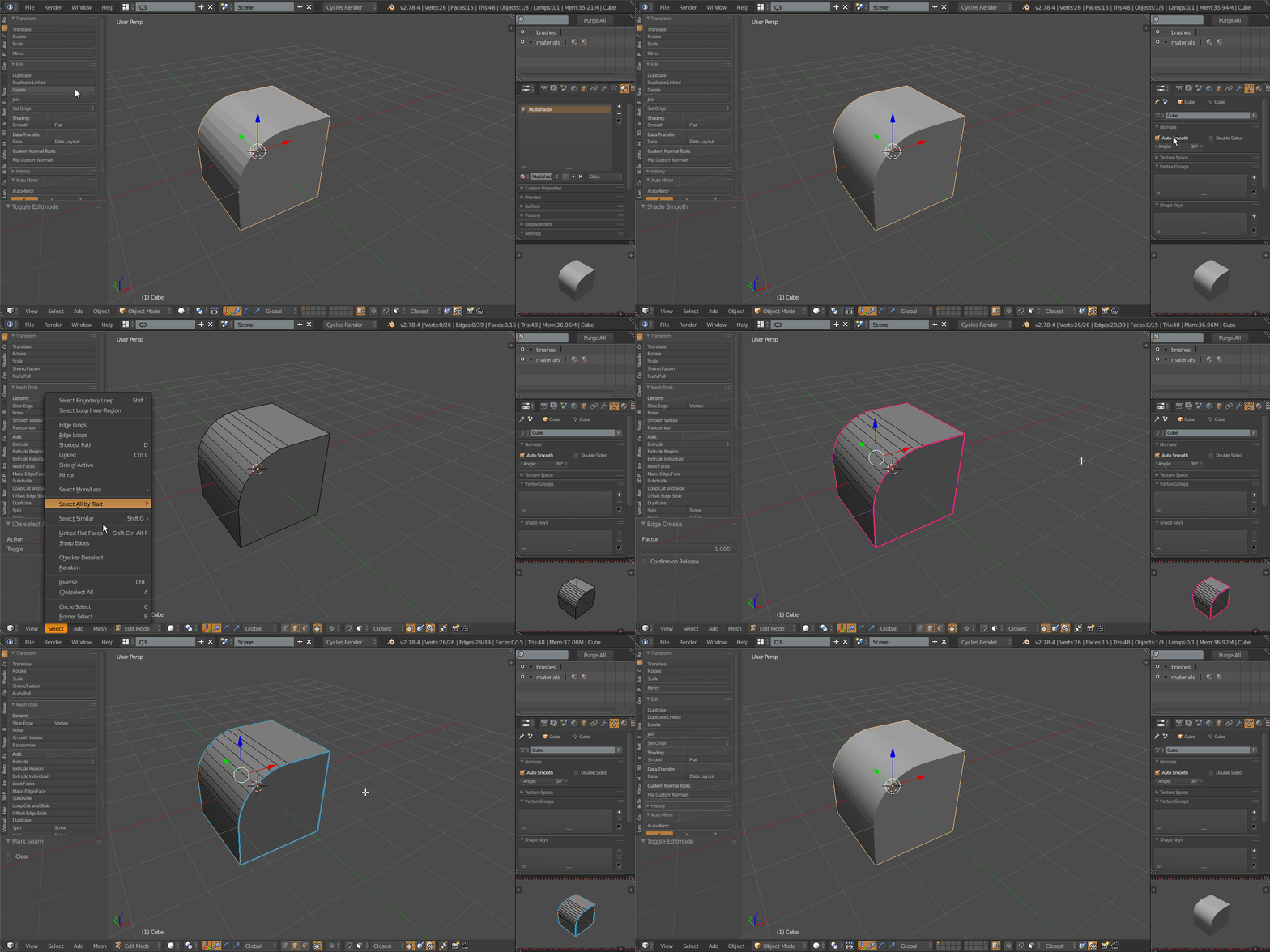
Another option for smoothing is going to object data panel and ticking “Auto smooth” checkbox. It works nicely, smoothing depends on edge angle, but from time to time it requires to mark edges sharp/ bevel weight manually, which can be a lot of work.
So, if Edge Split is no go, and Auto Smooth is only half-way solution, here comes Hard Ops addon. Smoothing is fast and automatic: you just select your mesh, press Q and choose “ssharpen” option.

It will automatically set shading to smooth from flat, enable autosmooth (for edges at angle < 60) and will mark edges as crease / sharp / seam / bevel weight based on sharp parameter. So this option is basically your manual autosmooth workflow but with better control and with automatic marking of edges. It speeds smoothing a lot. It can be used in various situations: if you want just to smooth your model, if you want to subdivide it (marking edges prior to subdivision help to maintain correct shape). You can also use ssharpen to quick select parts of your model (because it can automatically assign seams).
But it’s just a beginning. Another operator is Csharpen, which does everything ssharpen does, but it adds bevel modifier on your edges.
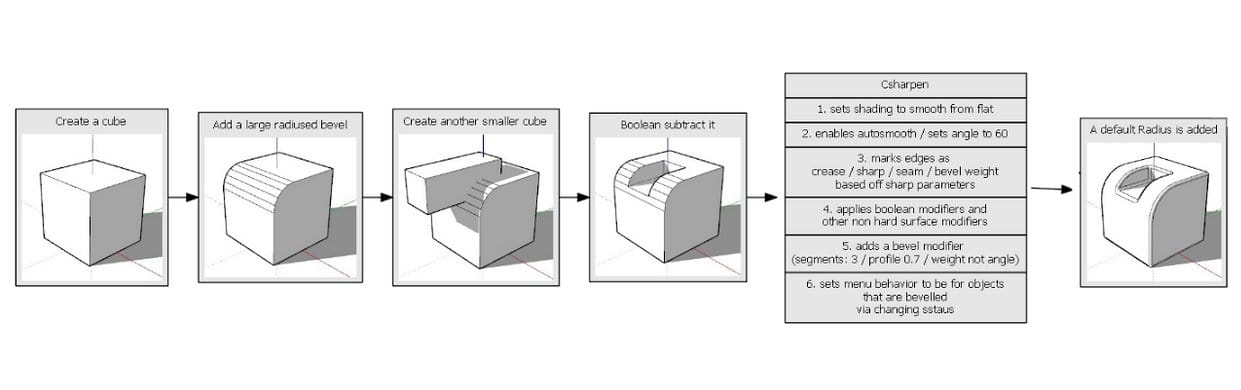
You can control the depth of it at any time. This tool is very useful during boolean workflow – after cutting the mesh, applying csharpen will give you nice bevels. If you want to reset your mesh status to default (no hard ops modifiers) , you can do it by selecting option from Q menu.
Cutting objects
Hard Ops is also a tool that allows you to apply boolean operation in very fast and intuitive way. It’s really powerful tool for making complicated, cut shapes in seconds, without ever going to Properties panel. You can cut object with other object and after the operation you can still manage your cut - by beveling its edges or making an array of cuts. You can also set the material that will automatically appear on the cut surface after boolean operation. Using booleans with Hard Ops is a pure fun and very creative process.
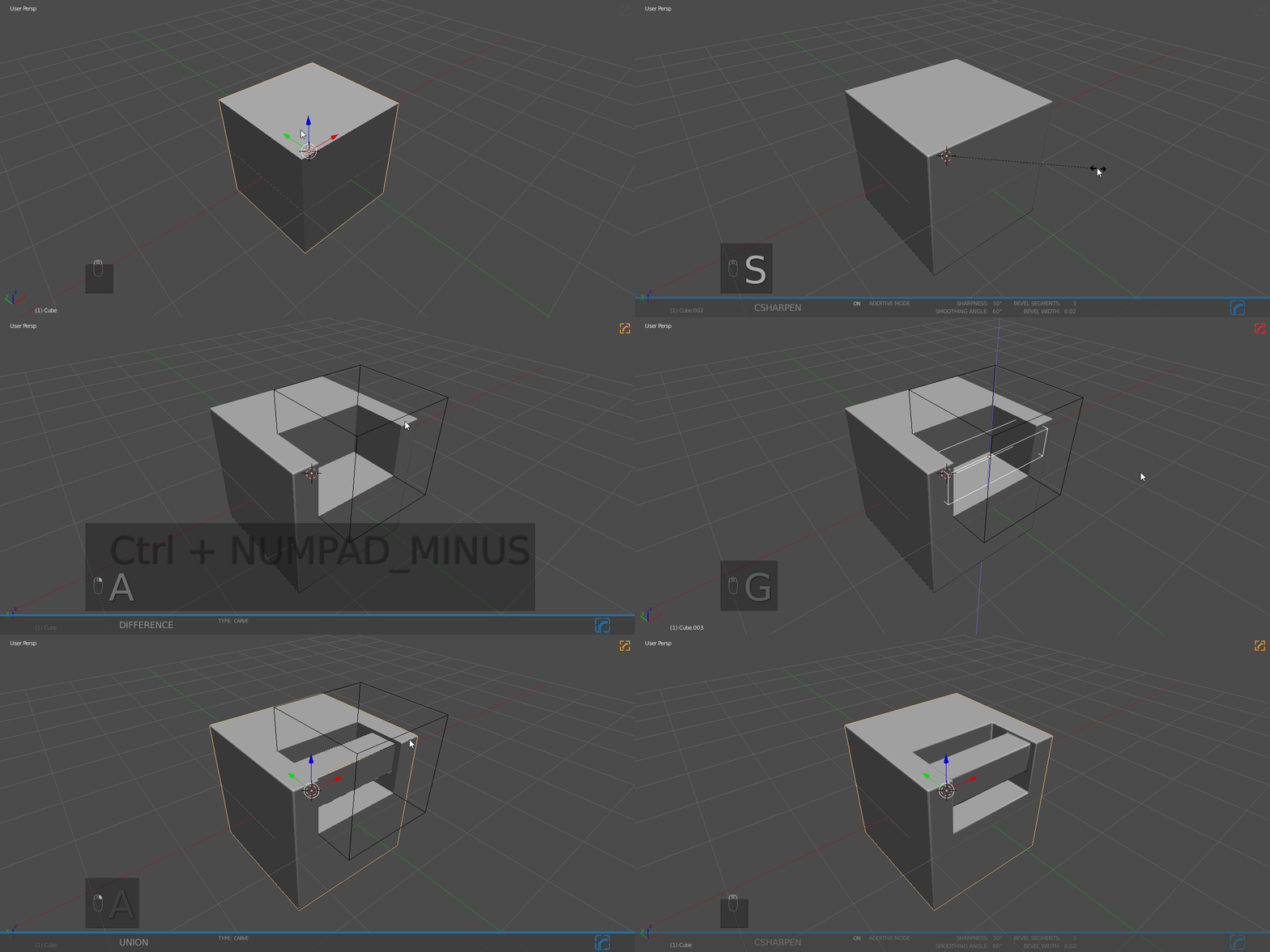
Hard Ops has even more to offer: it comes with a library of assets that can be inserted (and automatically aligned to selected object faces). There is a special asset category for fancy boolshapes used for cutting into your mesh. Pure joy!
You can also assign materials to your objects / faces with ALT-M shortcut, without going to Materials Panel.
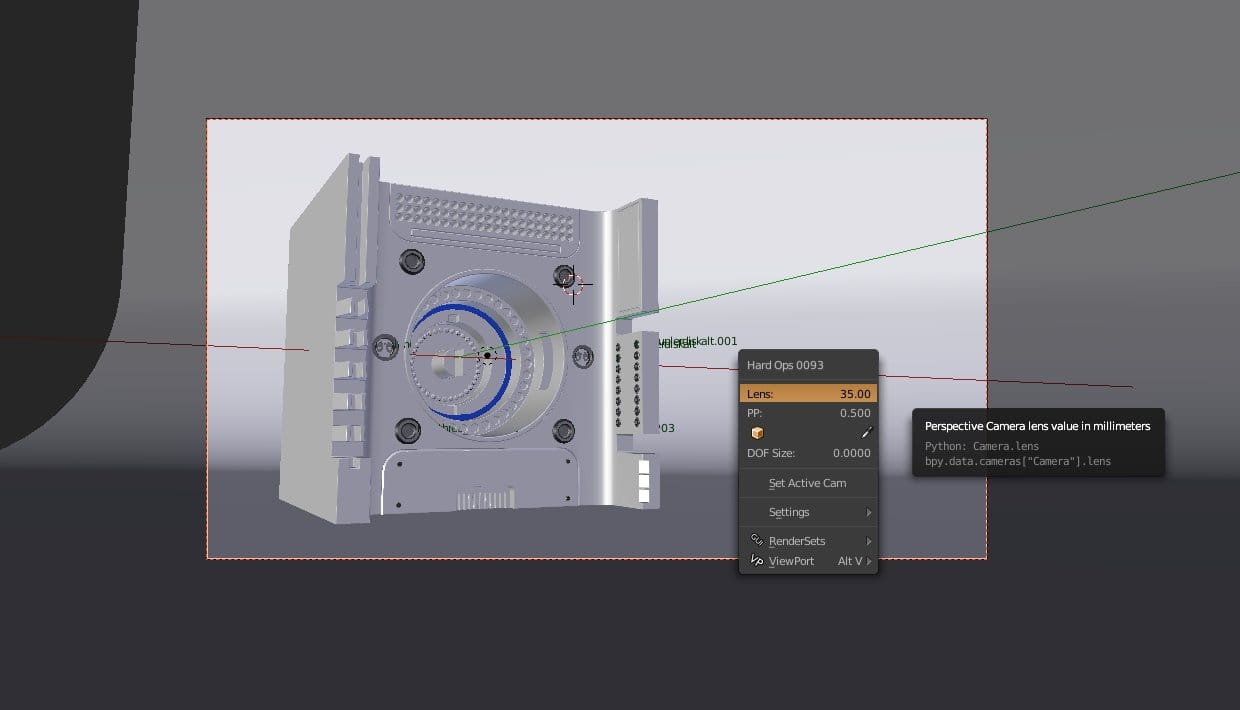
If you have camera selected, Q menu will give you options for lens / depth / dof / target and setting active cam. You can also use Q menu on a curve – managing its steps and taper settings.
Summary
Hard Ops is a very versatile and mature tool that will allow you to create complex models in very short amount of time. It saves time, it manages smoothing, it comes with great Boolean tools and asset library. It has even more options than described in this short test. We definitely recommend to check it out. It’s only $15 (plus tax) on Gumroad and it will make your life a whole lot easier. It integrates seamlessly with BoxCutter addon that improves boolean workflow even further.
Links:

Image by Michal Franczak
GIFs in the article are the courtesy of masterXeon1001.




LEAVE A COMMENT





|

|

|

|

|
 Customer zone
 Your orders
 Edit account
 Add project
 Liked projects
 View your artist profile
COMMENTS