Search
Cart
Sign in
  • offerCustomer zone
  • offerYour orders
  • offerEdit account

  • offerAdd project
  • offerLiked projects
  • offerView your artist profile

  • Dark mode
    ✔
HDRI Editor for Blender released

HDRI Editor for Blender released

Press release 2016-09-14 09:06 article  > Software

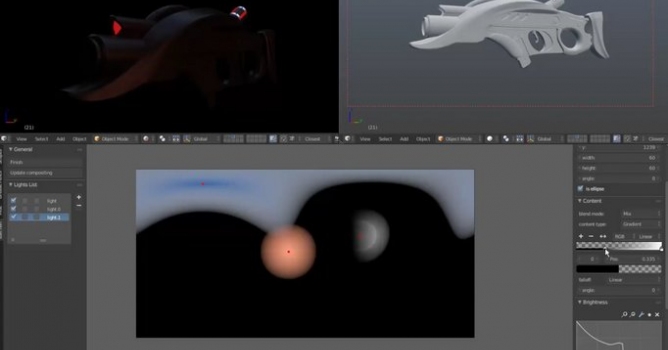
This Blender addon will allow you to make professional looking environment lighting.

It’s perfectly suited for character renders, product renders, studio renders and motion graphics regardless of your software of your choice.

Use PROMO CODE: “cool3dartist” for more than 15% discount (first 100 sales only). Gumroad product page: https://gum.co/TZkTq

Features:

  • Full 32bit editing support for both OpenEXR and Radiance HDR
  • Real time updates in preview render(Cycles Render)
  • Procedural Ellipse and polygon variable shapes (triangles, squares, pentagons etc)
  • Mix any images with procedural lights for ultimate realism.
  • Flat, Gradient and image content.
  • Gradient content with color interpolations, and linear,radial and conical falloff. with advanced controls for each.
  • Use the painting tools in Blender to paint light where you wish on the HDR environment, allowing you much flexibility.
  • Light linking for single object (Including/Excluding Lists coming soon)
  • Independent light bulb settings with brightness curve editing.
  • Unlimited light layers.
  • Multiple Blend Modes supported to mix lights(Mix, Add, Multiply etc.)
  • Save the 32bit image as HDR or OpenEXR and use it in your software of your choice (C4D, Maya, 3ds Max, Lightwave, MODO, Rhino)
Author: Press release Editor: Michał Franczak
Tags:
You may also like...
How to Speed Up Archviz Rendering Without Upgrading Your Hardware

How to Speed Up Archviz Rendering Without Upgrading Your Hardware

Save time, reduce stress, and focus more on the creative side of your projects.
×

LEAVE A COMMENT

You need to be logged in to leave a comment. Don't have account? Register now.