Krita is the free and open source painting application used by artists all over the world.
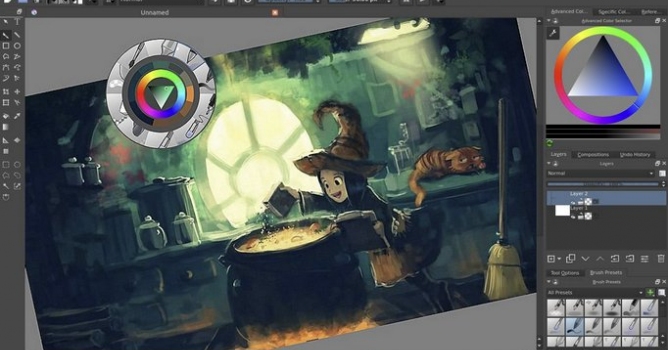
You can now do proper frame-by-frame animation in Krita. Multiple layers, all sorts of playback speeds, onion skinning, on top of all of Krita’s existing paint tools: It’s enough to make any animator’s fingers itch!
Animatable raster layers – Animated raster images with frames, and use the time-line docker to order them. Works in all color spaces and depths as well!
Onion skinning – This allows you to have an overlay of the previous and next frames, an important assistant when going from rough animation to smooth animation!
Importing image sequence – Import any set of images as an animated layer, automatically sorted by naming scheme.
Exporting image sequence – Export the whole animation as an image sequence, for further processing in other programs.
New dockers – timeline docker, animation docker, and animation workspace
CSV import and export – for layered animation, for use with TV-paint, or Blender via a plugin, courtesy of Laszlo Fazekas
Spriter scml exporter – Make the base image in Krita and then export it to this powerful cut-out animation tool for games.
Caching for Animation playback – Proper animation playback, in all sorts of frame-rates, relative speed-ups
Instant Preview for Big canvases! – Utilizing the power of OpenGL 3.0 you can now draw smoothly with 1000 pixel width brushes!
Frame dropping – For slower devices, we implemented frame-dropping, so that you can always see your animation at real-time speed!
Simplified merging – One hotkey to rule them all!
Multi-Layer Mania – Krita 2.9 had multi-layer selection and dragging and dropping. We spent this release expanding this functionality with moving, on canvas-selecting, merging, duplicating and more!
Quick select layers – Select All/Visible/Locked layers, or select them on-canvas via Shift+R+Click
Mass editing layer properties – Instantly rename multiple layers, or change their blending mode, or opacity, or any other property.
Group multiple layers – Or create Clipping Groups or just ungrouping with hotkeys.
In this walkthrough, we guide you through the process of building a polished 3D interior scene inspired by the cover of Archmodels vol. 306 – Table Sets.






 Customer zone
 Your orders
 Edit account
 Add project
 Liked projects
 View your artist profile











COMMENTS