We are more than an asset library

Watch our Showreel
Search
Cart
Sign in
  • offerCustomer zone
  • offerYour orders
  • offerEdit account

  • offerAdd project
  • offerLiked projects
  • offerView your artist profile

  • Dark mode
    ✔
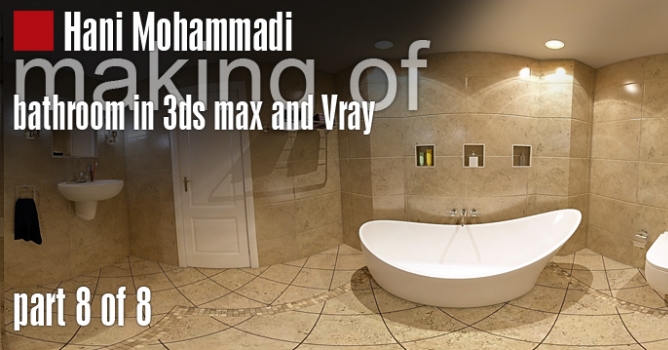
Creating a bathroom in 3ds max - 8 of 8

Creating a bathroom in 3ds max - 8 of 8

Hani Mohammadi for Evermotion 2013-02-27 11:10 tutorial  > 3ds MAX  > modeling

In this tutorial we are going to create a bathroom in 3ds max and render it with Vray.

The main goal of this tutorial is to show different techniques for modeling and rendering. So the objects and materials have been chosen according to this goal. The cad file of this project was made by Ulfat Ktaifan and idea of tutorial is from Asiyeh Zarrasi.

We divided this tutorial to 8 parts, (and 26 video files). This is final, 8th part.

Link to part 1

Link to part 2


Link to part 3

Link to part 4

Link to part 5

Link to part 6

Link to part 7

Download project files (3ds max 2012 and Vray 2)


goldencgbanner_1.jpg


AI_23_800x100.jpg


Link to part 1

Link to part 2


Link to part 3

Link to part 4

Link to part 5

Link to part 6

Link to part 7

That's all! Hope that You have enjoyed this tutorial! :)


 
Author: Hani Mohammadi for Evermotion
Tags:
You may also like...
Chaos V-Ray 7.5 for 3ds Max Adds AI Assistant with Sky Match, Render Critique, and OpenVDB Support

Chaos V-Ray 7.5 for 3ds Max Adds AI Assistant with Sky Match, Render Critique, and OpenVDB Support

V-Ray 7.5 ships with integrated AI tools that automate HDRI matching and asset selection, score render quality, and add native volumetric workflows. For 3ds Max archviz artists, the practical gains are clearest in volumetric support - but AI recommendations only help if they match your scene's intent.
×

LEAVE A COMMENT

You need to be logged in to leave a comment. Don't have account? Register now.