We are more than an asset library

Watch our Showreel
Search
Cart
Sign in
  • offerCustomer zone
  • coursesMy courses
  • offerYour orders
  • offerEdit account

  • offerAdd project
  • offerLiked projects
  • offerView your artist profile

  • Dark mode
    ✔
Tutorial: MadCar setup

Tutorial: MadCar setup

Andrey Kozlov 2008-01-02 00:00 tutorial  > 3ds MAX  > animation

REQUIRED FILES


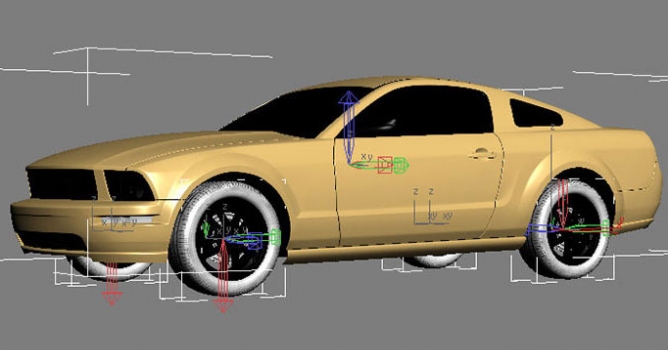
MADCAR SETUP
Move pivots of all objects to object center.

Turn on pivot snap.

Use tape to measure distance between back and front axles.

Measure distance between centers of left and right wheels.

Create MadCar object.

Set car length to half of distance between back and front axles.
Set front and back axle lengths to half of distance between left and right wheels.

Apply MadCar controller to a wheel.

Pick MadCar object.
Select apptopriate object type.

Use affect object only mod to correct wheel position.

Set appropriate wheel dimension.

Select a brake and apply MadCar controller.
Pick MadCar object.
Select apptopriate object type.
Use affect object only mod to correct brake position.

Do the same actions for the other wheels and brakes.

Apply MadCar controller to carcass.
Pick MadCar object.
Select appropriate object type.

Use affect object only mod to correct carcass position.

Pick surface object. Press Update Surface button.

Set start position of vehicle.
Just move green arrow to place what you need.

Press Reset Animation button to move vehicle to start position.

Set suitable End Time.

Press OnRunDriving button.
Click to transparent window and press ENTER.
 
Author: Andrey Kozlov
Tags: madcar
You may also like...
RTX 5090 vs. Dual RTX 5080s: Which Setup Wins for Archviz Render Farms

RTX 5090 vs. Dual RTX 5080s: Which Setup Wins for Archviz Render Farms

The RTX 5090 launched at $1,999 MSRP with 32GB unified VRAM, while two RTX 5080s cost the same upfront but split 16GB per card. Performance scales differently per engine: OctaneRender favors dual 5080s by 13%, but Blender Cycles and VRAM-heavy exteriors favor the single 5090.
×

LEAVE A COMMENT

You need to be logged in to leave a comment. Don't have account? Register now.
popoff 20:02:44  |  29-11-2010
... guys pls heeeelp ! I cant set-up this thing at all :( 01) When I asign madcar controler to any wheel , it moves in the middle of the mad car object and decrease size automaticaly rotating on 90deg - is that normal ? 02) Same thing happen with a body ( carcass ) :( 03) How can I setup start position - madcar object cant be moved - so I moved the plane ... 04) When I OnRunDriving - madcar object moves approx.200 frames and stop , geometry was not linked to the madcar object and did`t move at all ... Any suggestions ?!
renderclipps 03:33:16  |  24-05-2011
I tink this is for Madcar 1. Madcar 3 interface is very different to what is in this tutorial. I'll send a message to support