Search
Cart
Sign in
  • offerCustomer zone
  • offerYour orders
  • offerEdit account

  • offerAdd project
  • offerLiked projects
  • offerView your artist profile

  • Dark mode
    ✔
The Studio Lighting & Illuminance Kit (SLIK 2) for MODO is out

The Studio Lighting & Illuminance Kit (SLIK 2) for MODO is out

The Foundry 2016-02-05 11:16 article  > Software

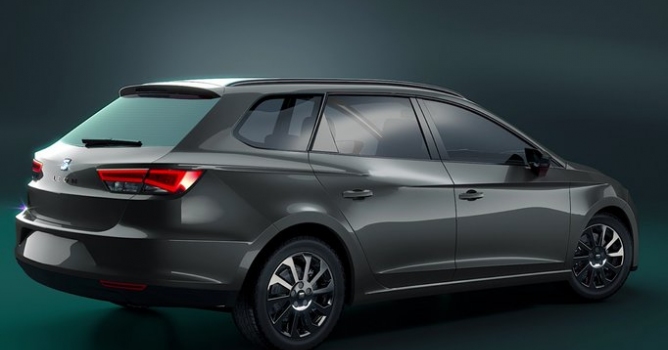
The Studio Lighting & Illuminance Kit (SLIK) is an extensive toolkit of items, presets, scenes, materials and video tutorials to help MODO artists create the lighting setups.

Without SLIK, artists spend considerable time refining light settings and setups to bring out the best in CG models; this process is often started from scratch and the result frequently lacks realism. SLIK lets you quickly put together studio lighting setups that mimic those found in the real world of photography, making renders more vibrant and believable, and helping you finish the job in less time. Nothing comes close to this type of streamlined workflow for creating realistic lighting setups with real-world lighting nuances that accentuate your creations.


What's new in SLIK 2?

  • Intuitive automatic light-targeting process
  • Lightboard Controller—a one-stop shop to control all SLIK lights including mute, solo, relink, intensity, color, global intensity
  • 34 new 4K light textures
  • Studio Save feature
  • HDR Bake feature
  • SLIK HDR Studio Swap: swaps from HDR to full studio lights to allow tweaking
  • In-camera control system for SLIK 2 lights
  • Automatic render pass with recoloring
  • Automatic composition script using Adobe® Photoshop CC 2015 or Adobe® After Effects CC 2015
  • Single-click preference system
  • Updated lights and presets
  • New smart material library
  • Material Override for quick lighting tests
  • Physical Sun preset system
  • Custom Preset Save feature
  • Ability to remove tripod/secondary meshes from view
  • Performance-optimized SLIK 2 assemblies and options
Author: The Foundry Editor: Michał Franczak
Tags: slik
You may also like...
How to Speed Up Archviz Rendering Without Upgrading Your Hardware

How to Speed Up Archviz Rendering Without Upgrading Your Hardware

Save time, reduce stress, and focus more on the creative side of your projects.
×

LEAVE A COMMENT

You need to be logged in to leave a comment. Don't have account? Register now.