Search
Cart
Sign in
  • offerCustomer zone
  • offerYour orders
  • offerEdit account

  • offerAdd project
  • offerLiked projects
  • offerView your artist profile

  • Dark mode
    ✔
Lumion 5.7 released

Lumion 5.7 released

Press release 2015-06-16 12:47 article  > Software

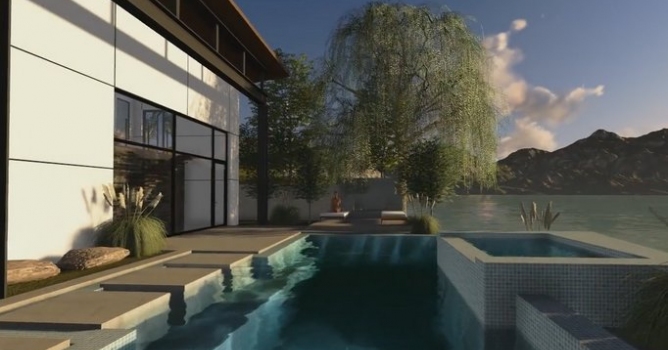
New version of visualization software is out. See what has changed.

New features:

  • New MyLumion mode: This mode allows you to export up to seven 360 degree panoramas per Lumion seat. The panoramas can be accessed on internet-enabled PCs, phones and tablet devices. It includes a new viewpoint editor in Lumion so that you can switch from one exported panorama to another by clicking on viewpoint icons in the published panorama project. Please note that MyLumion is a Beta service which means that it is still under development. Projects rendered to MyLumion.com using Lumion 5.7 and Lumion Pro 5.7 will be stored online until 1st January 2016. After November 2015 you can no longer make MyLumion projects. For more information, please see the Frequenty Asked Questions on MyLumion.com.

Please note that the Text Simple object as well as parts of some trees/plants are currently rendered multiple times from different angles on MyLumion panoramas. This is a known issue.

Movie Mode:

  • Mass Move effect: The new Toggle Dual Direction button makes it possible to toggle the direction of the animated objects as well as to enable lane traffic in opposite directions.
  • Mass Move effect: The new Toggle Cars/People/Imported Objects button allows you to specify which object categories should be affected by the path animation.

Build Mode:

  • New Resource Monitor: This is located in the top right corner and displays the amount of graphics card memory that is in use as well as the total available graphics card memory.

Model Library:

  • New Japanese flag (in Outdoor > Assorted category).
  • 15 new plants, flowers and grass models (Lumion Pro only - in Nature category).

Please note that scenes created in Lumion 5.7 cannot be opened in earlier versions of Lumion. If you need to import a Lumion 4.5.1 or 5.0 scene that includes Photo mode effects, you must save the effects as a file (Context Menu -> File -> Save). After importing the scene in 5.7, simply load the saved effect file in 5.7 via Context Menu -> File -> Load.

For changes and resolved errors, read Lumion 5.7 release notes.
 

Author: Press release Editor: Michał Franczak
Tags:
You may also like...
Using 3D building models for industrial and commercial visualizations

Using 3D building models for industrial and commercial visualizations

In professional visualization, buildings are more than background elements. They define context, scale, and clarity for industrial and commercial projects. Well-prepared 3D building models help viewers read a scene instantly and understand its purpose without relying on technical descriptions or supporting text
×

LEAVE A COMMENT

You need to be logged in to leave a comment. Don't have account? Register now.