Polyline creates colorful and fully controllable polygonal lines (this is nerd talk for straight lines) that can be animated in After Effects’ real 3D space. This means they can easily weave between your other 3D layers without any fancy comping necessary. After the polyline is created it can be easily edited. You can edit where it travels in space as well as the color and texture of each segment of the line (or the whole path at once).
- Polyline construct a rigged 3D polyline from the motion path of a layer.
- Polyline creates a straight segment between each pair of consecutive keyframes.
- Segments are precomp layers controlled by expressions (position, scale and orientation).
- They are connected to each other using a corner pin effect and powerful expressions.
- Polyline also creates null layers at each corner of the path, so you can dynamically modify the polyline by moving the nulls in 3D space. As each segment is a slice of a path precomp, you can easily change the appearence of the polyline by modifying each segment individually or the whole path at once.
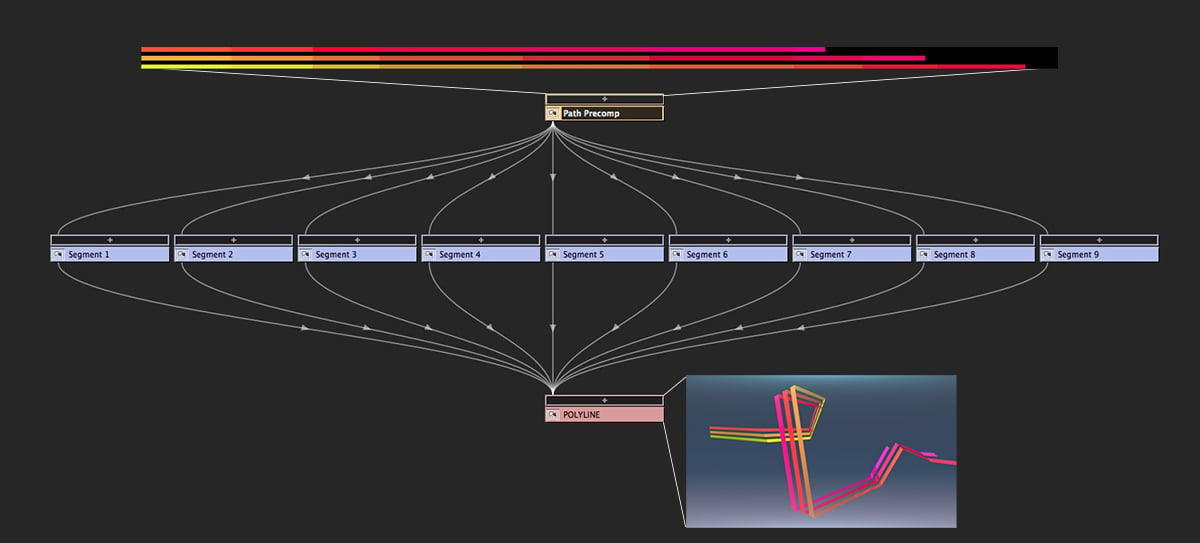
- The total length of a polyline cannot exceed the maximum size of a composition, i.e., 30,000px.
- Some display issues sometimes appear with the built-in corner pin effects used by Polyline (Corner Pin and CC Power Pin).
- Some motion paths yield degenerate cases for which a nice polyline cannot be constructed (for instance, a chain of orthogonal segments in x, y, then z plane).
- Modifying segments rotation can sometimes show important texture deformation.
Note on the trial version: The trial version is fully functional except that the number of segments is limited to 3, and the Closed Path option is grayed out.






 Customer zone
 Your orders
 Edit account
 Add project
 Liked projects
 View your artist profile













COMMENTS