Modern color management options are now integrated throughout Max thanks to OCIO color management, which is now accessible as a technology preview.
Users can now add boolean functions to the modifier stack by using a new boolean modifier.
The new boolean modifier includes an OpenVDB meshing technique, offering an alternative way for performing calculations. Since OpenVDb booleans are topologically independent of the source geometry, they frequently produce accurate results even in the presence of mesh errors, which would make conventional boolean methods ineffective.
An improved method of Phyllotaxis dispersal is used with the array modifier. In nature, especially in plants and trees, this kind of pattern can be commonly observed.
The new Material ID rollout in the array modifier allows for per-face or per-element management of the materials IDs. In addition to random and
sequenced options, it is also possible to randomize the remaining clones in an array by changing the IDs of the first and last ones.
There is now a progressive transform option available for the array modifier, which increases the transform value for each element.
Multiple Transform controllers can now be added to an object as levels of blended animation data using a new controller. This gives artists the ability to customize each layer's animation data and regulate how the layers interact.
The user can now swap between various materials by using a numeric index thanks to a new material node.
The motion paths function, which enables users to visualize animation paths, has been updated to operate with the new list controllers and with all controller types.
To use QT, the slate substance editor has been completely redesigned. It offers much greater customizability and dockability as a consequence, as well as significant speed gains.
There is now a new Compound component in the material editor that lets you build sub-graphs. Large graphs can be organized using these to improve readability. Right-clicking on a group of nodes and choosing Package Nodes in Compound will instantly create a compound.
With the addition of a list search feature and the use of QT, the modifier list has been improved so that users can now begin typing to locate the modifier they require.
To better fit with artists' processes, the Symmetry Modifier's default Mirror Axis is now X.
The STL Check modifier is now 5000% quicker and the STL import is an amazing 10,000 times faster.
Now, Auto Smooth is at least 10% quicker.
Splines can now be used with the Material Modifier without being changed into a geometry. When applied to a mesh, it can now also keep specified normals.
Veras 5.3 introduces NODES, a visual workflow builder now in Beta that lets users generate parametric geometry and bake it directly into Revit, Rhino, or SketchUp. The system shifts Veras from rendering-first to a full generative design platform with interactive design tools.
SketchUp 2025–2026 has added native PBR materials, AI image generation, and real-time rendering plugins like Lumion View, letting archviz artists produce photorealistic images without leaving the viewport. This collapses the traditional design-to-render pipeline.
Maxon's Redshift 2027.0 cuts render times by up to 15% through memory optimization and adds official Archicad integration alongside improved materials and live feedback tools.
Blender 5.3 arrives November 10 with DLSS 4.5 Ray Reconstruction, an AI-powered denoiser for Cycles that works on RTX 20–50 series cards. The upgrade promises faster interactive lighting workflows at near-final quality.
Chaos released V-Ray for Blender 7.4 with Windows ARM64 compatibility, Phoenix Ocean textures for exterior scenes, Quick Sun Caustics for realistic lighting, and tools to organize large asset libraries and migrate from Blender's native renderer.
Maxon's October 2026 release adds procedural vegetation scattering, reworked GPU memory management in Redshift, and liquid simulation—streamlining environment work and viewport iteration for archviz studios.
A free community plugin now lets 3ds Max users with older GPUs access neural rendering via DLSS 5, potentially speeding up renders without hardware upgrades.
Chaos released V-Ray for Blender 7.4 with Windows ARM64 compatibility, Phoenix Ocean textures for exterior scenes, Quick Sun Caustics for realistic lighting, and tools to organize large asset libraries and migrate from Blender's native renderer.
In this walkthrough, we guide you through the process of building a polished 3D interior scene inspired by the cover of Archmodels vol. 306 – Table Sets.






 Customer zone
 Your orders
 Edit account
 Add project
 Liked projects
 View your artist profile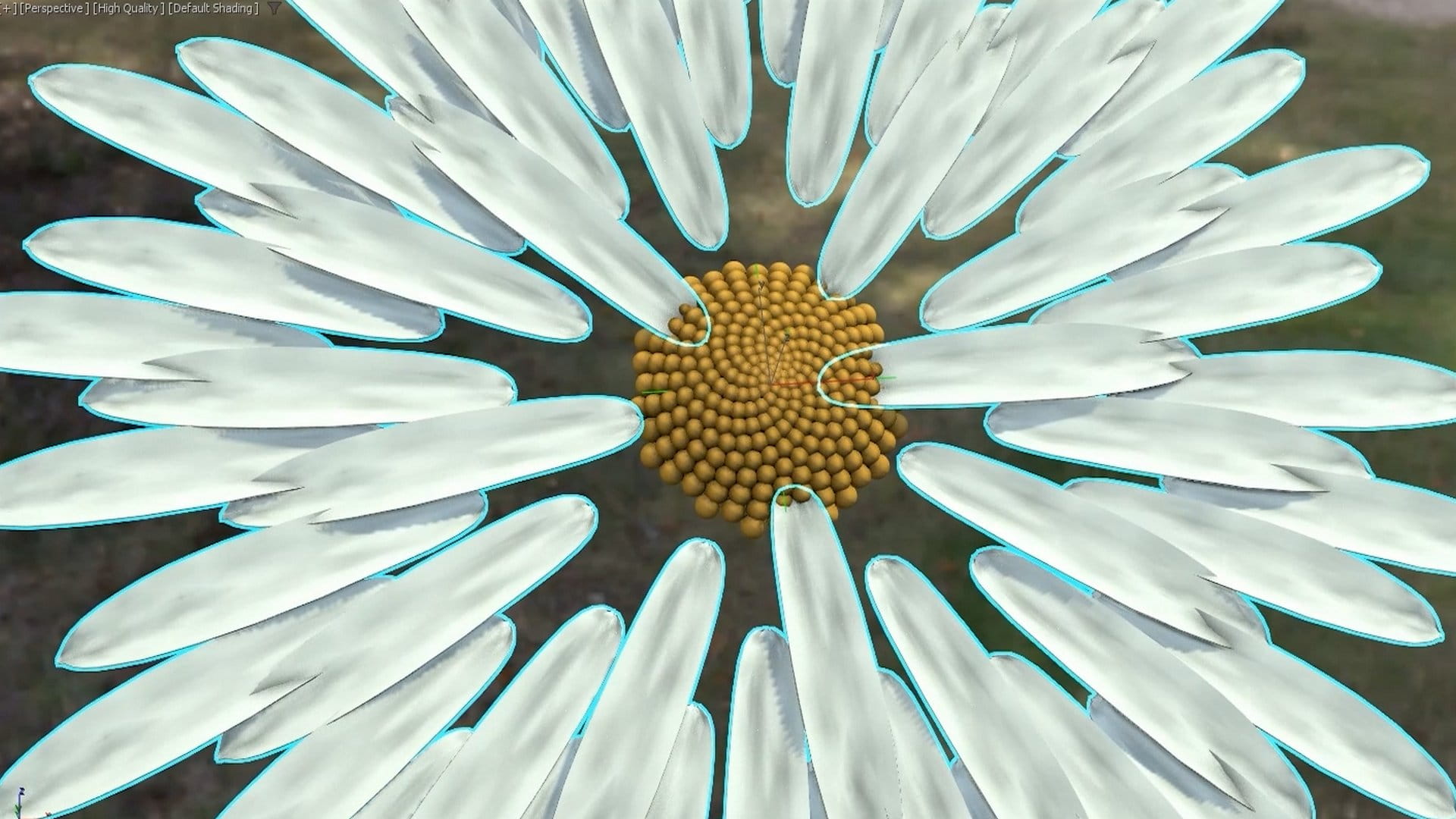













COMMENTS