Search
Cart
Sign in
  • offerCustomer zone
  • offerYour orders
  • offerEdit account

  • offerAdd project
  • offerLiked projects
  • offerView your artist profile

  • Dark mode

We care about your privacy

We use cookies to provide you with the best possible experience. They also allow us to analyze user behavior in order to constantly improve the website for you. The consent is voluntary. You can withdraw it at any time or renew it in Cookie settings on the home page. Withdrawal of your consent does not affect the lawfulness of processing performed before the withdrawal. Privacy Protection Policy
Accept all
Accept selection
Reject all

DecalPlacer 1.5 for 3ds Max

PR 2022-02-21 08:54 article  > Software

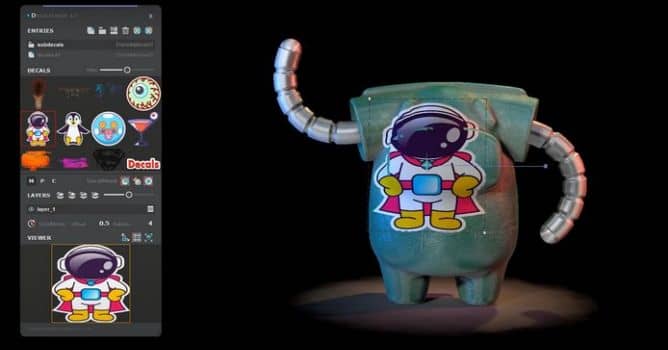
Add-on that speeds up placing decals on objects in 3ds Max.

The latest version adds Node-Locked License, new modern and resizable UI. You can now resize decals and keep dimension constraints. More new features in the video below.


Main Features

  • Store decals into a grid-based layout.
  • Supported decals file formats *.tif, *.png, *.jpg, *.jpeg.
  • Drag multiple files directly from explorer to grid list.
  • Fast placing, resizing and rotating decal.
  • Use custom material for decals.
  • Multi layered constructed decal.
  • Conform projection decal on target surface of a mesh.

For more visit DecalPlacer site.

Author: PR Editor: Michał Franczak
Tags:
You may also like...
Evermotion: More Than an Asset Library

Evermotion: More Than an Asset Library

How Evermotion became a full-scale production partner for archviz, automotive and synthetic data.
×

LEAVE A COMMENT

You need to be logged in to leave a comment. Don't have account? Register now.