Search
Cart
Sign in
  • offerCustomer zone
  • offerYour orders
  • offerEdit account

  • offerAdd project
  • offerLiked projects
  • offerView your artist profile

  • Dark mode
    ✔
PureRef helps you to work with reference images

PureRef helps you to work with reference images

Pressdesk 2018-01-03 08:31 article  > All

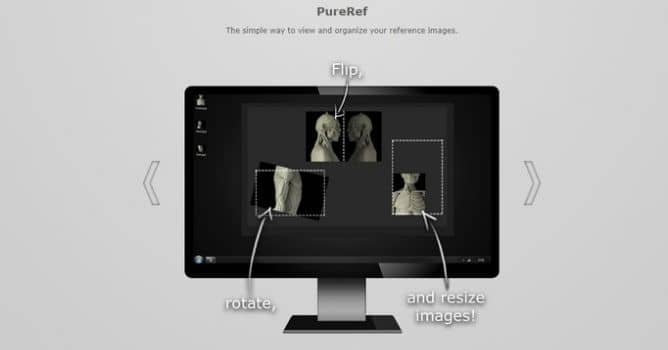
PureRef was created to be a simple and lightweight tool for artists to organize and view their reference images.

Features:

  • You can drag-n-drop files from your computer or images directly from browsers. You can also use the right-click menu or ctrl+v to paste them. You can edit your images in a few ways to fit your reference need. You can select one or more, focus on one or more(doubleclick/space), rotate (freely or with snapping using shift), flip, scale, crop, change opacity, delete and save images.
  • Optimize the canvas around your images, pack your images, toggle always on top-function, toggle transparent to mouse-function, lock the canvas for editing, clear canvas.
  • Customize keybindings.

You can download PureRef. It's donationware: you name your price.

Author: Pressdesk Editor: Michał Franczak
Tags: pureref reference
You may also like...
Evermotion: More Than an Asset Library

Evermotion: More Than an Asset Library

How Evermotion became a full-scale production partner for archviz, automotive and synthetic data.
×

LEAVE A COMMENT

You need to be logged in to leave a comment. Don't have account? Register now.