We are more than an asset library

Watch our Showreel
Search
Cart
Sign in
  • offerCustomer zone
  • offerYour orders
  • offerEdit account

  • offerAdd project
  • offerLiked projects
  • offerView your artist profile

  • Dark mode
    ✔
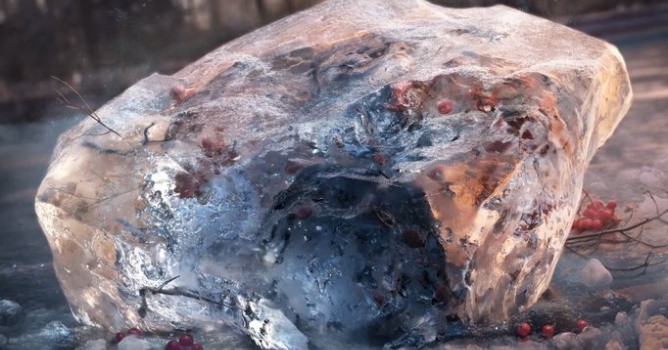
How To Create Realistic Ice in Blender

How To Create Realistic Ice in Blender

Gleb Alexandrov 2015-01-07 08:21 tutorial  > Blender  > texturing

Learn how to create very convincing ice in Blender, in 5 steps.

Author: Gleb Alexandrov
Tags: ice
You may also like...
Redshift 2027.0: 15% faster renders, Archicad support, and ray-traced glass

Redshift 2027.0: 15% faster renders, Archicad support, and ray-traced glass

Maxon's Redshift 2027.0 cuts render times by up to 15% through memory optimization and adds official Archicad integration alongside improved materials and live feedback tools.
×

LEAVE A COMMENT

You need to be logged in to leave a comment. Don't have account? Register now.
razorskate 21:12:48  |  07-01-2015
this ice looks like bread or a stone but not ice
rustam2013 23:58:26  |  09-01-2015
Amazing tutorial! it's look like realistic, thanks sharing your technique with us.
George R. 14:38:04  |  11-01-2015
Agree with razorskate, at one point it might have been a nice piece of ice but this is way over processed.