We are more than an asset library

Watch our Showreel
Search
Cart
Sign in
  • offerCustomer zone
  • offerYour orders
  • offerEdit account

  • offerAdd project
  • offerLiked projects
  • offerView your artist profile

  • Dark mode
    ✔
Unreal Engine 4 Export Basics

Unreal Engine 4 Export Basics

Arrimus 3D 2016-05-12 09:19 tutorial  > Unreal Engine  > misc

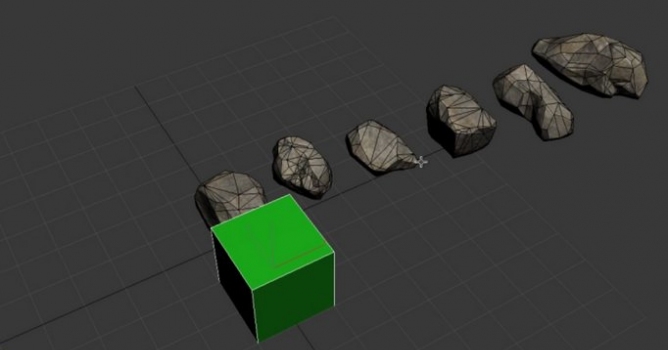
In this video Arrimus 3D shows how to export assets from 3DS Max to Unreal Engine 4.

Author: Arrimus 3D
Tags: export
You may also like...
Autom8Labs launches 22 free AI skills for 3ds Max, Revit, Grasshopper and more

Autom8Labs launches 22 free AI skills for 3ds Max, Revit, Grasshopper and more

Autom8Labs has released 22 free MCP Skills for AI agents across nine AEC applications, including tools to configure Corona and V-Ray in 3ds Max and build parametric definitions in Grasshopper. The skills pair with MCP Connectors linking Claude directly into design software to automate rendering setup and parametric workflows.
×

LEAVE A COMMENT

You need to be logged in to leave a comment. Don't have account? Register now.