Search
Cart
Your cart - 0 items
Total: € 0
Total: € 0
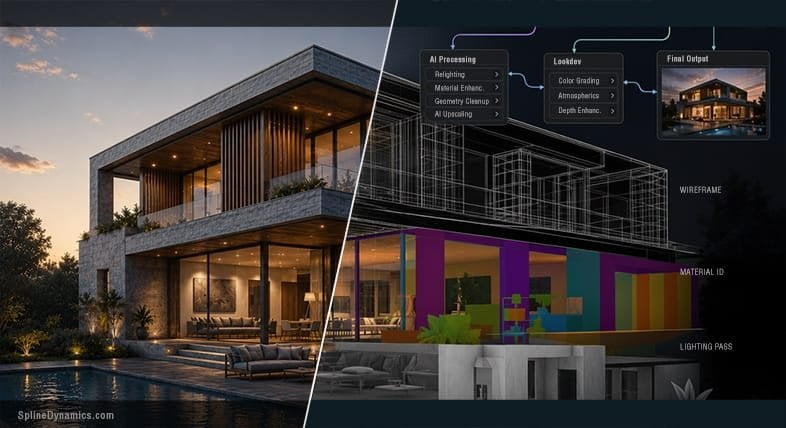

A convincing image can still be wrong. That observation from Chaos Product Marketing underpins a harder truth about AI visualization in professional archviz: client clarity is not client approval, and approval is not delivery.
AI renders appear to accelerate archviz work dramatically. Marketing materials claim 80–90% time savings. Reality is more modest. Independent studio research shows realistic workflow acceleration from AI is 20–35% overall, and only in specific phases of the project. The gap between showcase images and production reality exposes a structural problem: polished AI samples rarely reflect the actual effort behind them - failed generations, prompt iterations, Photoshop corrections for inpainting artifacts, and hours spent reproducing a result that worked once.
That modesty matters because it forces a hard choice: where in your workflow does AI actually help, and where does it introduce more risk than speed?
A single AI-generated exterior can be extraordinary. But a real project requires eight to twelve coordinated views of the same building: matching materials, consistent geometry, identical context, and the ability to handle client revisions across the full set. According to Hernán A. Rodenstein, Founder of Spline Dynamics, current generative AI cannot maintain this coherence reliably. "A single AI-generated image can be extraordinary. But a real project requires eight to twelve coordinated views of the same building - matching materials, consistent geometry, identical context, and the ability to handle client revisions across the full set. Current generative AI cannot maintain this coherence reliably."
This is where the workflow breaks. AI regeneration for a single revision means regenerating the image, and elements already approved may not survive intact. "AI regeneration doesn't work that way - a revision means regenerating the image, and the elements already approved may not survive intact. For client-facing work with multiple feedback rounds, this is a fundamental limitation," according to Rodenstein. Clients see one stunning concept render. They approve it. Production begins - and the coordinated view set cannot be delivered with the consistency the client now expects.
Visual plausibility is not architectural correctness. As visualizer Sammy Elnidani notes, an AI-generated exterior may look convincing while quietly changing window spacing, slab thickness, access routes, balcony depth, or material joints. "Visual plausibility is not architectural correctness. An isolated AI-generated exterior may look convincing while quietly changing window spacing, slab thickness, access routes, balcony depth, or material joints."
This reshapes how studios should integrate AI tools. The 3D scene must remain the source of truth: geometry, dimensions, camera position, material assignments, spatial relationships, and all the information that must not change across revisions. AI belongs as an enhancement layer on top of that foundation, not instead of it.
According to Elnidani, "Production-ready workflow needs control over the information that must not change, consistency across versions, traceability, and recoverability." Rodenstein frames it more directly: "The 3D scene remains the source of truth. Geometry, camera position, proportions, material assignments, scene structure: these still come from the model. What's changing is what gets built on top of that foundation."
This matters for structure. Elnidani advises: "Automate stable, repetitive operations before ambiguous creative decisions." Creative selection, design interpretation, and approval must remain human responsibilities. When an image passes visual, technical, and architectural checks, it can still fail brief-compliance checks. The boundary between what must not change and what AI can explore should be defined before generation, not inferred after an appealing result appears.
The workflow challenge runs deeper. Clients now often arrive with their own AI-generated moodboards or concepts, requiring professionals to bridge the gap between a client's AI dream and a professional, buildable reality. This means approval gates and project management systems that keep clients informed, revisions structured, and delivery processes tight. Otherwise, the time you save with AI gets consumed by disorganised client communication and scope creep.
Rodenstein puts it plainly: "An AI render in the concept phase is exceptional. Faster, cheaper, freer. An AI render in the sales phase, with broken balconies and inconsistent rhythm, is not a workflow. It is a deferred problem."
For studios adopting AI, the path is narrower than marketing suggests. Use AI to move faster from plans to first visuals, testing several directions before final production begins. Use structured checkpoints: sign-off on the 3D scene, the camera angles, the material approach, and the revision scope before any AI generation happens. Keep your 3D models and material libraries as the control layer. Treat AI outputs as presentation aids, not source geometry. And remember that human final approval remains vital - not just for accountability, but because a beautiful image that breaks the building is not a faster workflow. It is a liability deferred.
Lead image: Spline Dynamics Blog








LEAVE A COMMENT







|

|

|

|

|
 Customer zone
 Your orders
 Edit account
 Add project
 Liked projects
 View your artist profile

COMMENTS