Search
Cart
Sign in
  • offerCustomer zone
  • offerYour orders
  • offerEdit account

  • offerAdd project
  • offerLiked projects
  • offerView your artist profile

  • Dark mode

We care about your privacy

We use cookies to provide you with the best possible experience. They also allow us to analyze user behavior in order to constantly improve the website for you. The consent is voluntary. You can withdraw it at any time or renew it in Cookie settings on the home page. Withdrawal of your consent does not affect the lawfulness of processing performed before the withdrawal. Privacy Protection Policy
Accept all
Accept selection
Reject all

V-Ray for Unreal Beta released!

Press Release 2018-03-27 15:31 article  > All

With V-Ray for Unreal you get the best of both worlds - real-time and ray tracing.

The fastest, simplest way for you to:

  • Bring V-Ray scenes into real-time
  • Render ray traced images directly from Unreal

Now in open beta, we’re excited to introduce V-Ray for Unreal. Now you can bring V-Ray scenes from 3ds Max, Maya and SketchUp directly into the Unreal Editor. And for the first time, you can render ray traced, photorealistic images with V-Ray directly from Unreal. 
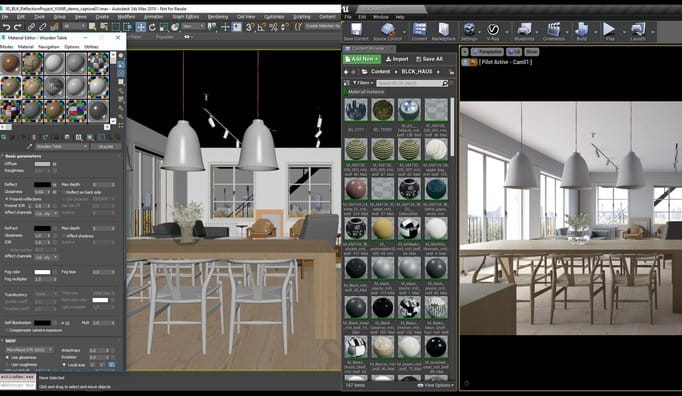


  • Create the scene the same way you normally do using V-Ray for 3ds Max, Maya and SketchUp. Then, export a V-Ray scene from your host application and import it using V-Ray for Unreal.
  • When you import your scene, V-Ray for Unreal automatically converts your materials and lights into real-time equivalents for UE workflows.
  • At the same time, your original materials from V-Ray for 3ds Max, Maya and SketchUp remain connected to their real-time versions and are called up when you’re ready to render. 


sl_00951_Untitled


  • When you render with V-Ray for Unreal, you get the exact same photorealistic quality that V-Ray is known for.
  • V-Ray taps into the full combined power of your GPUs and CPUs for ultrafast ray tracing.
  • Once your V-Ray scene is imported, you’ll be ready to take full advantage of the VR capabilities in the Unreal Editor.
  • V-Ray for Unreal makes it fast and easy to create high quality, immersive VR.
  • Now you can build great looking real-time experiences and ray traced renders all from a single, shared workflow using V-Ray for Unreal.

More information on Chaos Group site.
Author: Press Release Editor: Michał Franczak
Tags: vray
You may also like...
Top 5 Vray Workshop - the best works of last week

Top 5 Vray Workshop - the best works of last week

Vray Workshop + Evermotion present TOP 5 VRay Workshop - selection of the best works presented during the week.
×

LEAVE A COMMENT

You need to be logged in to leave a comment. Don't have account? Register now.