Evermotion: More Than an Asset Library
How Evermotion became a full-scale production partner for archviz, automotive and synthetic data.


Total: € 0
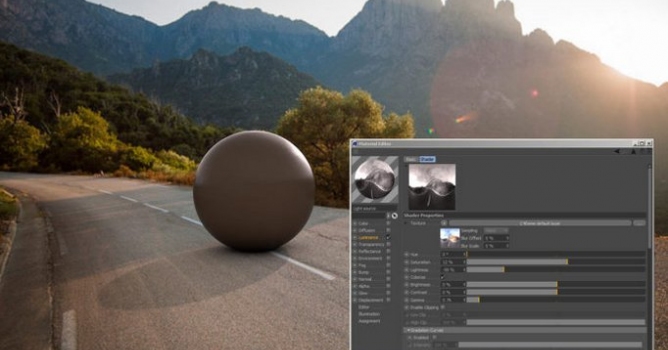

Easy Compositing
Matte background, that allow to create perfect compositing, it’s been implemented since version 2 but now can express its best with Cinema 4D R18. With just one click you can have a perfect render where 3D object is perfectly adapted to the background.
HDRI Tone Mapping
Does not your HDRI fits to the backplate images? Now you can easily adjust it to get them coincide
New Floor System
Floor it’s been totally reprojected giving the ability to select between 3 different kind of preset, Rounded – Infinite – Matte, or you can also disable it. It’s very easy now create perfect HDRI studio rendering or Image Compositing. Now you can create accurate floor reflection thanks to the new I.O.R., finally the reflection it’s driven by Index of Reflection that provides Physically correct renderings.
C4Dome + Cinema 4D R18 = The perfect marriage
C4Dome it’s able to enhance C4D properties, specially if we are talking about reflectance channel… Obviously the ability to split and manage accurately reflection gives to you stunning renderings, but also motion tracking meets in an admirable way our HDRI Studio plugin.
Save & Load Lighting Presets
We received a lot of requests from people that were searching for a solution to store the settings that they have used into their scenes and use into other c4dome projects, the solution it’s Save&Load tool into C4Dome that allows to save your scenes as presets and, if you want, share the info stored in a simple file with other people of the community. You can also download new Lighitng Presets from renderking site every month!
HDRI Painter
Probably this is the most advanced feature of C4Dome 2.75 thanks to this incredible tool you are able to paint, IN REAL TIME, your own HDRI map. Yes you have understood, you can draw your map directly into the viewport and find the perfect light/reflections that fits to your scene!




LEAVE A COMMENT





|

|

|

|

|
 Customer zone
 Your orders
 Edit account
 Add project
 Liked projects
 View your artist profile
COMMENTS