Search
Cart
Sign in
  • offerCustomer zone
  • offerYour orders
  • offerEdit account

  • offerAdd project
  • offerLiked projects
  • offerView your artist profile

  • Dark mode

We care about your privacy

We use cookies to provide you with the best possible experience. They also allow us to analyze user behavior in order to constantly improve the website for you. The consent is voluntary. You can withdraw it at any time or renew it in Cookie settings on the home page. Withdrawal of your consent does not affect the lawfulness of processing performed before the withdrawal. Privacy Protection Policy
Accept all
Accept selection
Reject all

MaxToC4D v3.0 is out

Press release 2016-07-22 09:12 article  > Software

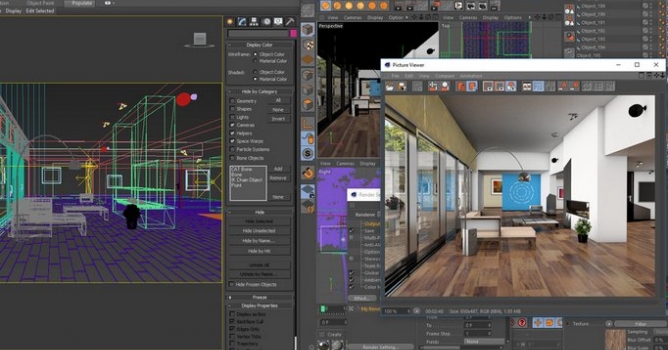
Transfer scene from 3DsMAX to C4D with 2 clicks.

Main features:

  • Fast make C4D library from 3DsMax models
  • Vray Support! Transfer 3DsMax scene even if they have vray materials or lights (if vray for 3DsMax installed)
  • Automatic transfer from 3DsMax Vray to Vray For C4D "similar" materials and settings. (Watch video)
  • Open models made for 3DsMax and send them to C4D
  • Use the powerfull 3DsMax modeling tools and instant transfer the scene to C4D with 2 clicks
  • Send scene from 3DsMax to C4D and from there its easier to integrate to After Effects CC - Live Integration
  • Big update to handle more complex scenes and adding support for more features and lot of fixes
  • Max Vray Proxy > C4D Instances support added
  • Smarter convertions based on scene analysis
  • New Interface with diferent export options
  • Easily change temp path from interface
  • Vray-Logo appearing in C4D won't show when exporting in default mode!
  • Faster C4D V-Ray material Import!
  • Added support to Proxy/Instances,IES lights, Mesh/Turbosmooth, etc
  • Vray 3.0, 3.20. 3.30. 3.40 support

More info on MaxToC4D site.

Author: Press release Editor: Michał Franczak
Tags:
You may also like...
How to Speed Up Archviz Rendering Without Upgrading Your Hardware

How to Speed Up Archviz Rendering Without Upgrading Your Hardware

Save time, reduce stress, and focus more on the creative side of your projects.
×

LEAVE A COMMENT

You need to be logged in to leave a comment. Don't have account? Register now.