This is a commercial Script.
Features:
* Display thumbnails of your models.
* Library Example to show how to arrange your own libraries.
* Merge as vrayproxy: convert the model and save .vrmesh.
* Merge on references: replace your scene models with other models.
* Paint mode over surfaces good to vegetations.
* Render Thumbnail of your models.
Installation
* Download installation file
* Unzip to root folder of 3ds max
* Start 3ds max
* Go to Customize>Customize User Interface>Keyboard or Toolbars> Category "HCG"> command "HCG Asset Browser PRO"
* Assign a shortcut
* Activate the shortcut
More informations: http://www.hermidacg.com
In this walkthrough, we guide you through the process of building a polished 3D interior scene inspired by the cover of Archmodels vol. 306 – Table Sets.






 Customer zone
 Your orders
 Edit account
 Add project
 Liked projects
 View your artist profile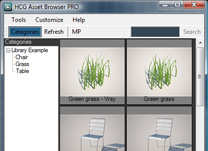











COMMENTS