Evermotion: More Than an Asset Library
How Evermotion became a full-scale production partner for archviz, automotive and synthetic data.


Total: € 0
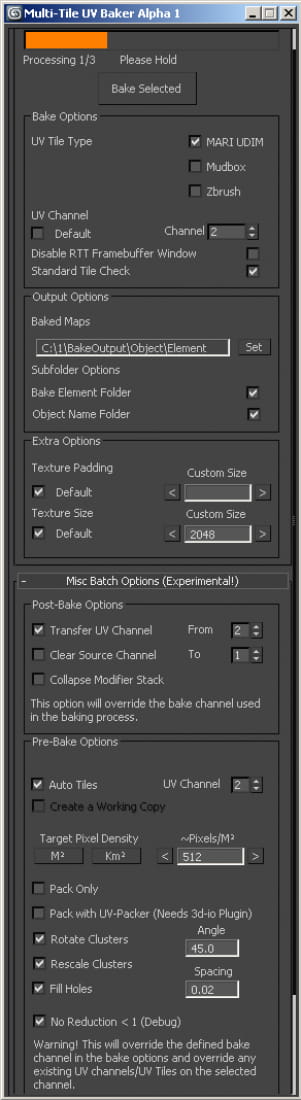
Hello everyone! I have been working with this tool for a few months, mostly on our internal projects, and I think it's time to get it out there. It's still in development so feel free to suggest any additions or alterations. It can easily be altered to accommodate 3rd party packages such as other UV-Packing/Unwrapping plugins, both for Pre and Post Bake actions. The Multi-Tile UV Bake Tool allows you to bake multi-tile texture collections in 3ds Max using common naming conventions such as MARI UDIM, Mudbox or Zbrush. By default, baking textures in 3dsMax is limited to the 0,1 UV Space. Without this tool, manually exporting/baking collections is extremely time consuming and quite forbidding, especially when dealing with large tile collections. The bake tool was developed in order to process and export multi-tile uv data sets in 3ds Max for direct use with Amplify Texture 2 in Unity Pro, as an added bonus it’s a great pipeline addition if you need to take your 3ds Max projects into other Multi-Tile Based authoring tools such as MARI. The Multi-Tile UV Bake Tool automates and enhances the time consuming process of manually baking multiple tile collections in 3dsMax. The tool outputs tile collections in MARI UDIM, Zbrush, Mudbox and compatible naming conventions. It works with any type of render engine capable of using the Render To Texture extension such as Vray, Mental Ray, Brazil, finalRender or similar packages. It works by taking the required bake element information directly from the Render to Texture Dialogue. Any Render Element available in the dialog can be baked with this tool, including Displacement, Normal or even Occlusion maps. The tool uses any options previously set up in the dialog, including projection settings or specific element parameters. The bake tool provides several batch options that will simplify and enhance your workflow. Baking hundreds or even thousands of tiles becomes a trivial task with automatic tile detection and several batch override options such as padding, tile size, texture density and UV Flatten options. I'm preparing a couple of extensive video tutorials covering various subjects, from Video Game related bakes to Architectural and Product Previz. In the meantime, anyone familiar with texture baking should be able to pick it up using the Manual as reference. Trial Download (Watermark) In-Depth Tutorial & Tool Overview https://www.youtube.com/watch?v=JKrfaD3_rng Bake Tool Manual Product Page The Bake Tool is free for all Amplify Texture 2 licensees. Amplify is our texture virtualization (aka MegaTexture) solution for Unity3d. Amplify Texture 2 Page Any feedback would be welcome and extremely helpful. Thanks! Ricardo Teixeira @rant3d Technical Artist - Amplify Creations
Posted on 12.12.2014
 AmplifyCreations
LEAVE A COMMENT

|

|

|

|

|
 Customer zone
 Your orders
 Edit account
 Add project
 Liked projects
 View your artist profile