Search
Cart
Your cart - 0 items
Total: € 0
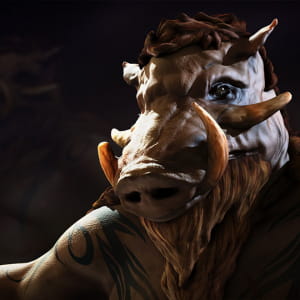
http://assets2.digitaltutors.com/banners/forum_posts/new_10-07-2013_b.jpg Build your creative skills in October with nine new courses featuring powerful applications, innovative workflows and professional pipelines in this week’s release (http://www.digitaltutors.com/software/New-Training-tutorials). Say hello to the powerful Arnold renderer with an Introduction to Arnold for Maya. Learn about Arnold's specialized light attributes and other invaluable tools and features that are why top studios and artists love it (http://www.digitaltutors.com/tutorial/1344-Introduction-to-Arnold-for-Maya). http://assets2.digitaltutors.com/banners/forum_posts/new_10-07-2013_4.jpg Get Started with CINEWARE in After Effects and familiarize yourself with the innovative workflow between After Effects and CINEMA 4D (http://www.digitaltutors.com/tutorial/1337-Getting-Started-with-CINEWARE-in-After-Effects). Begin using 3D in your After Effects projects and learn how easy it is to interchange elements between these two applications. http://assets2.digitaltutors.com/banners/forum_posts/new_10-07-2013_2.jpg Create your own fantasy creature by using animal references in Creating an Armored Beast in ZBrush (http://www.digitaltutors.com/tutorial/1300-Creating-an-Armored-Beast-in-ZBrush). Watch how to quickly create accessories and armor for your creature and use these techniques to create more creatures of you own. http://assets2.digitaltutors.com/banners/forum_posts/new_10-07-2013_1.jpg Master a Professional Tracking Pipeline in Maya and SynthEyes (http://www.digitaltutors.com/tutorial/1297-Building-a-Professional-Tracking-Pipeline-in-Maya-and-SynthEyes). Start the course by preparing your footage for tracking, then create the correct scale camera in Maya, and build out a whole 3D scene based on the camera that you track. More Highlights from This Week’s Release: Drawing Character Model Sheets in Photoshop (http://www.digitaltutors.com/tutorial/1310-Drawing-Character-Model-Sheets-in-Photoshop) Sculpting Human Hands and Feet in ZBrush (http://www.digitaltutors.com/tutorial/1356-Sculpting-Human-Hands-and-Feet-in-ZBrush) Painting Realistic Skin in MARI: Hands (http://www.digitaltutors.com/tutorial/1328-Painting-Realistic-Skin-in-Mari-Hands) Creating a Wood Frame Model in Revit (http://www.digitaltutors.com/tutorial/1336-Creating-a-Wood-Frame-Model-in-Revit) Creating User Feedback in Unity (http://www.digitaltutors.com/tutorial/1331-Creating-User-Feedback-in-Unity) Watch the October new training video and see all of the latest courses to follow on Digital-Tutors (http://www.digitaltutors.com/software/New-Training-tutorials). Keep learning and growing your skills, subscribe today to access new courses and every course in the Digital-Tutors training library today! (http://www.digitaltutors.com/11/pricing.php) Get started and watch select courses and lessons with a free demo account (https://www.digitaltutors.com/11/register.php) Let us know what training you'd like to see next, submit a training request (http://support.digitaltutors.com/categories/20066079).
Posted on 07.10.2013
 Digital-Tutors





LEAVE A COMMENT


|

|

|

|

|
 Customer zone
 My courses
 Your orders
 Edit account
 Add project
 Liked projects
 View your artist profile